Guide
What is store banner management?
Store banner management is a marketing tool that lets you show campaign and informational messages in the right place at the right moment on your ordering page; it boosts conversion and reduces the support load.
Short answer
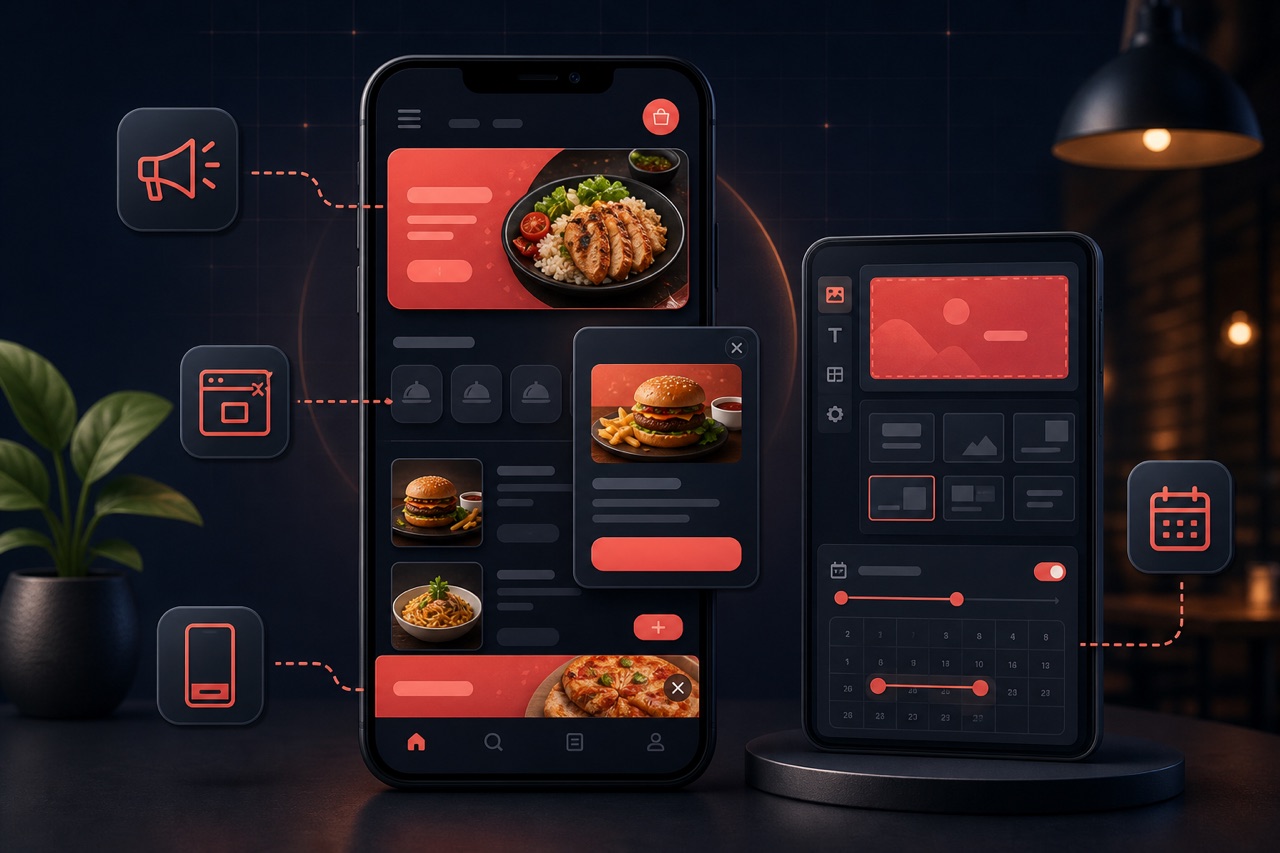
Store banner management is about creating and managing visual and text messages at different points of your ordering page (the top hero area, campaign strip, above categories, popup, cart and the mobile sticky area). In Yededoy you can define a desktop and mobile visual for each banner, schedule a date range, set smart triggering conditions (e.g. exit intent, first visit) and offer content in multiple languages. Campaign banners that have expired close automatically.
Definition
A banner is a visual message block shown to the customer on your ordering page. Banner management lets you control the type, placement, timing and target device of these messages from a single panel. The aim is to drive orders, grow the basket or convey operational information (e.g. we're closed, it's busy).
A desktop and mobile version can be provided separately for each banner; content can be prepared in multiple languages. Campaign banners are given a start–end date and become inactive automatically when they expire. For types like popups, smart triggering (exit intent, cart waiting, first visit, delay, scroll percentage) can be used.
How does it work?
Banner management typically works like this:
- You pick a banner type: hero (top area), campaign strip, above category, popup/modal, cart, mobile bottom sticky or an informational banner.
- You define a visual/text and link (CTA) for desktop and mobile; if you like, you enter the content in multiple languages.
- You give campaign banners a start and end date; the banner closes automatically when it expires.
- For types like popups, you choose the trigger condition (exit intent, first visit, a set delay, scroll percentage).
- You set the display priority of the banners, publish them and track their performance (impressions, clicks) to revise them.
Benefits
The right banner, shown at the right moment, contributes to both sales and experience.
Higher conversion
Hero and campaign banners make the offer visible in the first seconds and drive orders.
Bigger basket
Cart and above-category banners raise the average order value with upsell/cross-sell.
Less support load
Informational banners (opening hours, busy periods) answer frequently asked questions upfront.
Device-appropriate experience
Separate visuals for desktop and mobile deliver a legible, clickable presentation on every screen.
Components of banner management
These parts are used to manage store banners effectively:
Banner types
Different placement types such as a hero image, a campaign strip and a banner above a category.
Scheduled publishing
Banners turn on/off automatically with start/end dates (e.g. a holiday campaign).
Targeting
Show a banner to different audiences by channel (QR/online) or segment.
Visual and responsive variants
Separate images/ratios for desktop and mobile for a clean look on every screen.
Link and CTA
A clickable call directing the banner to a category, item or campaign page.
Performance report
Measure which banner drives conversion with impression and click (CTR) data.
Related technical guides: restaurant campaign management, digital menu, restaurant marketing strategies.
Best practices
To get the most from banners:
- Show only a few banners at a time; too many distract attention and lower conversion.
- Use a shorter message and legible visual on mobile; always test the mobile view.
- Give campaign banners a date range so they close automatically when they expire.
- Don't overdo popup triggering; provide value without annoying the customer.
- Look at impression and click data and simplify banners that aren't working.
Related guides and solutions
Frequently asked questions
- Which banner types can I use?
There are types such as hero (top area), campaign strip, above category, popup/modal, cart, mobile bottom sticky and informational banners. The available types and limits may vary depending on your subscription plan.
- Can I provide different visuals for desktop and mobile?
Yes. You can define a desktop and mobile version separately for each banner, so you get a legible and clickable appearance on every screen.
- What happens when a campaign banner expires?
You define a start and end date for campaign banners; when they expire, the banner becomes inactive automatically, with no need for you to close it manually.
- Can banner content be multilingual?
Yes. You can prepare banner content in multiple languages; the customer sees the appropriate content based on the language they select.
Summary
Store banner management is about managing the hero, campaign, above-category, popup, cart and mobile sticky banners on your ordering page from a single panel. For each banner you define a desktop/mobile visual, date schedule, smart triggering and multilingual content. Set up right, it boosts conversion, grows the basket and reduces the support load.
Get started
Contact us about an online ordering solution for your business and start taking orders on your own channel with Yededoy.