
Yededoy partner
Burger restaurant ordering application
Burger restaurants that require customization of meatballs, sauces and side products open a commission-free online channel with the Yededoy burger restaurant ordering application. Optimized flow for fast service.
For commission-free infrastructure, module comparison and setup guidance, see the burger ordering system page.
Short answer
Burger restaurant ordering application is the digital infrastructure where fast-casual and burger-focused kitchens manage online menu, customization and delivery orders.
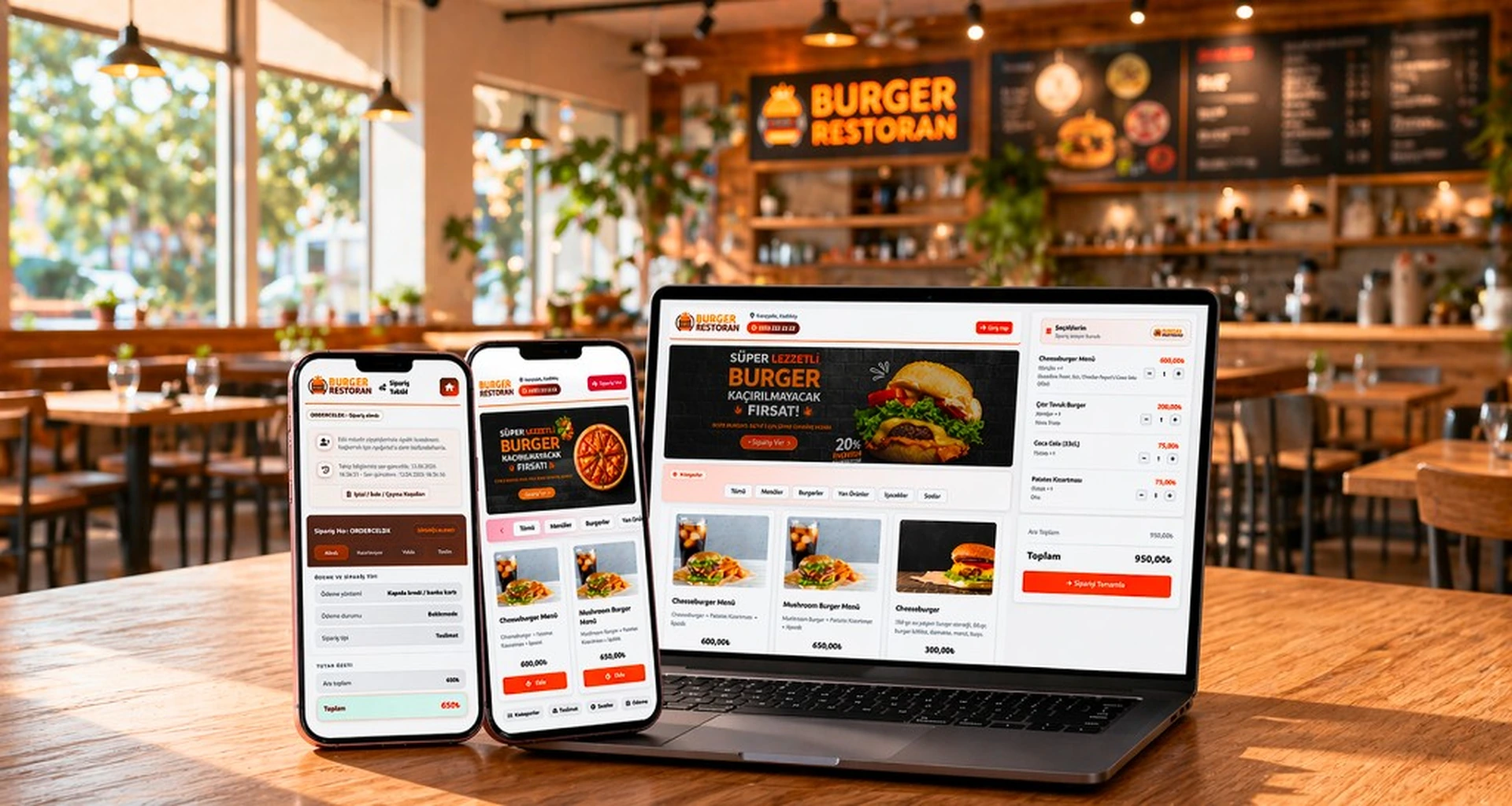
What is the burger restaurant ordering app?
Burger restaurant ordering application is the digital infrastructure where fast-casual and burger-focused kitchens manage online menu, customization and delivery orders. The customer chooses meatballs, bread, sauce and side items step by step.
Yededoy offers a commission-free direct order channel to burger establishments. Campaign menus, combo packages and take-away discounts are defined from the panel; The order is sent to the kitchen with clear instructions.
In burger restaurants, the combo menu and side product upsell flow increases the basket average.
Vegan and gluten-free options can be highlighted on the menu with separate labels.
Brand colors and hero images are adapted to your burger identity from the theme settings.
Potato, drink and sauce packages are presented in menu groups, allowing quick selection.
- Ingredient and sauce customization
- Combo and menu packages
- Take-away and courier delivery
- Theme with brand colors and logo
Ultimately, the burger restaurant ordering app forms the digital showcase and operational backbone of your business; It offers single-centered management instead of paper menus and scattered order channels.
How does the order flow work in a burger restaurant?
The customer enters your burger restaurant ordering app page, adds items to the cart and selects the payment method. The panel queues the order; Preparation time is updated on the kitchen screen.
- Identify burger variants and extras on the menu.
- Let the customer order from the browser; no app download required.
- Let the order appear on the kitchen and cash register screen.
- When ready, use customer notification or SMS integration.
Order priority and preparation time can be adjusted automatically during busy hours; Repeat customers can quickly repeat their favorite orders.
For take-away orders, the ready notification can be sent to the customer via SMS or push.
You can maintain kitchen capacity by temporarily closing order acceptance during busy hours.
Campaign codes can be used with social media posts.
Benefits to the burger business
In the quick service segment, clear ordering and short waiting times are competitive advantages. Customization options reduce phone errors.
- Commission-free direct sales channel
- Detailed product options and price differences
- Managing the cash register crowd with the take-out queue
- Mobile compatible menu and quick checkout
- Defining campaigns and coupons
Marketplace dependency decreases; Brand loyalty is strengthened through your own site.
Customization options digitally fix forgotten sauce and extra requests on the phone.
Repeat customers can reorder their favorite burger combo with a click.
Table number matching can be done with QR at food court locations.
Burger restaurant ordering application allows you to instantly update combo prices during campaign periods; Printed menu printing costs are eliminated.
Which burger establishments use it?
Gourmet burger, fast-casual chain candidates and single-branch burger kitchens can take online orders with Yededoy.
- Neighborhood burger restaurants
- Food court and shopping mall branches
- Ghost kitchen burger brands
- Take-away focused quick service points
Panel usage can be learned with a small team; Theme settings adapt to your brand.
Only delivery-oriented menu configuration is suitable for Ghost kitchen models.
Franchise candidates ensure brand consistency with a white-label theme.
With the burger restaurant ordering application, traffic from social media campaigns turns directly into baskets; You won't get lost in brokerage platform search results.
Operational transformation with burger restaurant ordering application
Opening a digital order channel is not just publishing a website; It keeps your kitchen, checkout and delivery processes aligned. The burger restaurant ordering application is the software layer that ensures this alignment. Consciously directing phone orders to a digital link in the first weeks will accelerate adaptation.
Staff training takes a short time: order confirmation, preparation time updates and cancellation scenarios can be displayed on the panel in a few minutes. On the customer side, the abandonment rate remains low because the cart and payment steps are kept simple.
- Define order approval and rejection rules
- Test kitchen printer or display integration
- Clarify delivery and pickup hours
- Compare first month reports with marketplace performance
Frequently asked questions and practical tips
Instead of trying to make the menu perfect all at once, new businesses can choose to start with core products and expand from the panel. Photo quality directly affects conversion; Prioritize your best-selling products.
Add links to your social media bio, receipts, and table QR cards to direct your customer support line to the digital channel when using a burger restaurant ordering app. Defining an order URL on your Google Business Profile brings organic traffic.
- Keep menu photos up to date
- Show the minimum cart and delivery fee transparently
- Proactively update lead time during peak hours
- Schedule coupons or free spin-offs for loyal customers
- Review lowest selling items with monthly reports
As scale grows, burger restaurant ordering app data becomes valuable for menu engineering. You can read which product combinations are profitable, at what hours the delivery team is not enough, and which campaigns bring repeat orders from the panel reports. These insights support intuitive decisions with concrete metrics.
Yededoy support team is with you even after installation: you can constantly improve your channel with integration questions, theme settings and operational best practice sharing. The goal is not just to take orders; is to establish a sustainable and profitable digital sales line. You can track the return on your burger restaurant ordering application investment through monthly order volume, average basket amount and reorder rate.
Related topics and resources
Plan burger restaurant ordering app with mobile ordering, takeout and pricing pages.
Issues you need to consider with a burger restaurant ordering app in the Yededoy ecosystem include pricing, commission comparison, and setup process.
- contactless ordering system
- Ordering site without POS
- delivery and takeaway order system
- order online without downloading app
- takeaway order system
The links below lead to relevant solutions for your burger business.
Our communication channels are open to request a demo or submit your questions. The registration and installation guide helps you step by step.
Frequently asked questions
Is a separate mobile application required for a burger restaurant?
No; Yededoy offers a mobile-friendly web ordering page. Detail: order without downloading the app.
How are extra ingredients and sauce prices defined?
Product options are added from the panel; You can set the price difference for each option.
Can a burger restaurant take orders without commission?
Yes; Yededoy does not receive commission for endorsement on your own channel. For comparison to the commission guide Look.
Get started
Contact us about an online ordering solution for your business and start taking orders on your own channel with Yededoy.