
QR Ordering System
Start Taking Table Orders with QR Menu
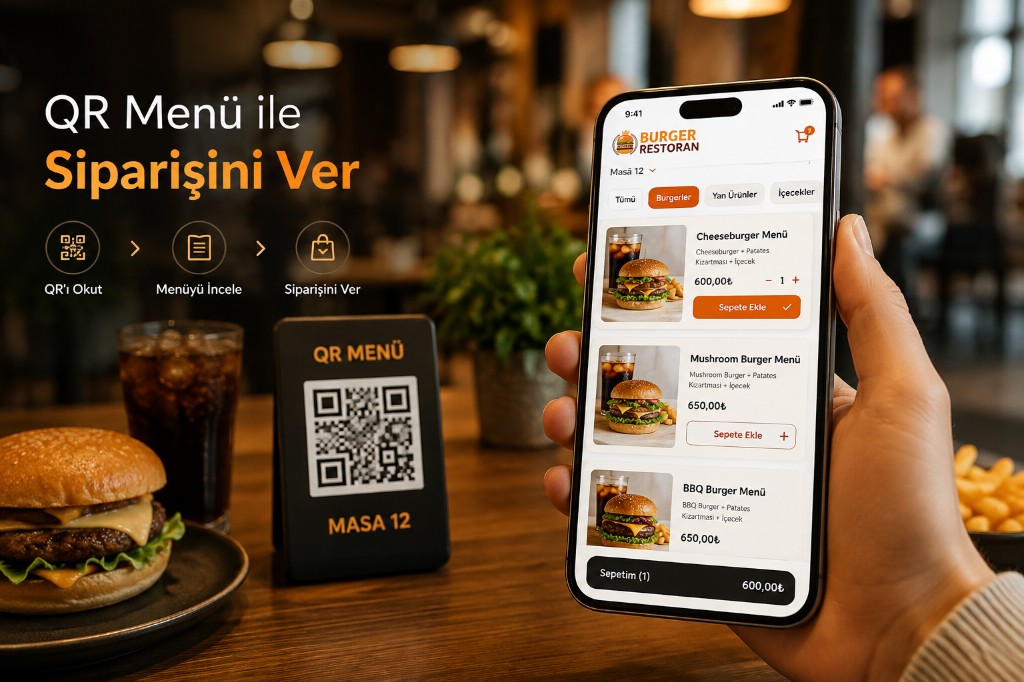
Guests scan the table QR code, open your menu instantly, and place orders without downloading an app.
Offer a free digital menu with QR Menu, or add QR Menu + Order or QR Menu + Order + Payment as you need.
- 0 App downloads
- Digital menu ordering & payment
- SSL Secure connection
- 100% Up-to-date menu
Start with Free QR Menu
Not every business needs online table ordering on day one.
That is why QR Menu is free to use.
Place QR codes on tables so guests can view:
on their phones.
When the menu changes, you do not need a reprint.
Update in the panel and publish instantly on QR Menu. Manage the catalog via online menu.
Later you can move to QR Menu + Order or QR Menu + Order + Payment.
QR Menu
FreeGuests scan the table QR code and view your digital menu.
- QR code
- Digital menu
- Product photos
- Product descriptions
- Prices
- Allergen info
- Multilingual menu
- Instant menu updates
Guests view the menu and place orders with staff.
QR Menu, Ordering, and Payment in One Flow
Use QR Menu at three levels based on what your business needs.
Show Menu → Take Orders → Take Payment
QR Menu
FreeGuests scan the table QR code and view your digital menu.
- QR code
- Digital menu
- Product photos
- Product descriptions
- Prices
- Allergen info
- Multilingual menu
- Instant menu updates
Guests view the menu and place orders with staff.
QR Menu + Order
Table orderGuests pick items, add them to the cart, and send the order from the table.
- Digital menu
- Items & options
- Cart
- Order note
- Table-based orders
- Order panel
- Kitchen display
Guests build the order themselves. Orders can reach the kitchen display.
QR Menu + Order + Payment
Full flowAdd online payment to the QR Menu and order flow.
The guest:
- Scans the QR code
- Views the menu
- Selects items
- Places the order
- Pays online
Table order through payment can complete in one flow. See payment integrations.
How the QR Ordering System Works
-
QR Code Scanned
The guest scans the table QR code with their phone camera.
-
Menu Opens
Your mobile QR Menu opens in the browser.
-
Items Browsed
Guests see products, prices, options, and descriptions.
-
Order Created
With QR Menu + Order, guests select items and send the order from the table.
-
Order Reaches the Kitchen
The order lands in the restaurant panel and kitchen display.
-
Payment Made
With QR Menu + Order + Payment, guests can pay online after ordering.
Table Ordering Without an App
The QR ordering system runs in the mobile browser.
Your guest does not need to:
- Open the App Store
- Download from Google Play
- Create an account
to reach the menu via QR code.
A phone camera is enough.
- QR Code
- Menu
- Order
- Payment
Take Table Orders with QR Menu + Order
Do not stop at menu viewing.
With QR Menu + Order, guests:
- Scan the QR code.
- Open the menu.
- Pick an item.
- Set options.
- Build a cart.
- Send the order from the table.
Orders go straight to the restaurant panel and kitchen display.
Guests create orders without staff re-entering them into the system.
From Table to Payment with QR Menu + Order + Payment
Businesses that want online payment can use QR Menu + Order + Payment.
At the table, the guest:
- Views the menu
- Creates the order
- Sends the order
- Pays online
Payment rails follow the integrations you choose. Details: payment integrations.
One Menu, All Ordering Channels
Use the same QR Menu products across channels.
-
QR Menu
-
QR Menu + Order
-
Web Online Ordering
-
Delivery Orders
-
Pickup
can share the same product and menu infrastructure.
When price, description, image, or stock changes, related menu and ordering channels can update together.
Manage Tables with QR Codes
Assign a QR code per table to track where orders come from.
Create separate QR sets for different areas:
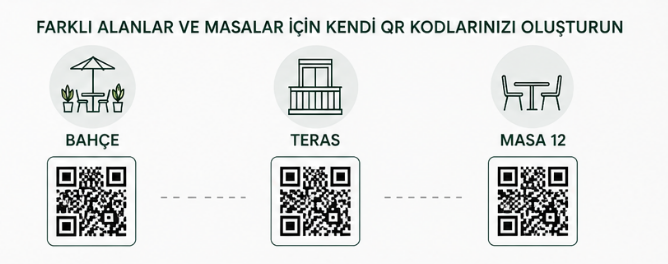
- Dining room
- Terrace
- Garden
- Bar
- VIP area
- Event area
With QR Menu + Order, table info travels with the order into the restaurant panel.
Current Menu, Current Prices
Printed menu changes often mean reprints.
With QR Menu, management happens in the panel. Run the catalog from online menu.
- Add a new product.
- Change a price.
- Take an item offline.
- Change a photo.
- Update a description.
- Set a promo price.
Changes can publish instantly on the digital menu.
That makes QR Menu practical for restaurants that change prices or items often.
What QR Menu + Order Gains Your Restaurant
Less Manual Ordering
Guests create orders directly in the system.
Faster Order Flow
Fewer steps where staff re-enter orders.
Current Menu
Price and product changes are managed in the panel.
Fewer Menu Prints
No reprint for every new price or product.
Central Management
Manage QR, web, delivery, and pickup from one product base.
Commission-Free Own Channel
Build your restaurant ordering channel and send guests to your brand. Commission-free ordering.
QR Menu and Web Ordering Can Share One System
You do not need separate menus for QR and your website.
Use the same product catalog for:
- QR Menu
- QR Menu + Order
- QR Menu + Order + Payment
- Online food ordering system
- Delivery orders
- Pickup orders
.
Products, prices, and options can be managed from one central panel.
Frequently Asked Questions
Is QR Menu free?
Yes. Standard QR Menu is free. Guests scan a QR code to view your digital menu.
What is QR Menu + Order?
It adds table ordering on top of QR Menu. Guests browse, select items, and send the order from the table.
What is QR Menu + Order + Payment?
It combines QR Menu, table ordering, and online payment in one flow.
Do guests need an app for QR Menu?
No. Guests scan with the phone camera and view the menu in a mobile browser.
Can I use QR Menu only for menu display?
Yes. Standard QR Menu can be used free for digital menu viewing only.
Can I upgrade to QR Menu + Order later?
Yes. Start with free QR Menu, then activate table ordering when ready.
Do QR Menu + Order tickets reach the kitchen?
Yes. Orders can go to the restaurant panel and kitchen display.
Can guests pay online with QR Menu + Order + Payment?
Yes. When online payment is enabled, guests can pay after ordering through supported payment rails.
Can QR Menu work with the website ordering system?
Yes. QR Menu and the web online ordering system can share the same product and menu infrastructure.
Does every product need its own QR code?
No. Use QR codes that open your restaurant menu. For table-based orders, create table-specific QR codes.
Start with Free QR Menu
You do not need the ordering module just to digitize your menu.
QR Menu is free.
When you need them:
- QR Menu + Order
- QR Menu + Order + Payment
you can digitize table ordering and payment as well.